The adif2dxq program converts ADIF contest logs from N1MM Logger+, Win-Test and WriteLog (and possibly others) into DX4WIN .DXQ format.
Version 9.9 of the program was released on 10 December 2021. Go to the Version History to download the installation program.
IMPORTANT: If you try to start the program and see any error messages similar to these:
- The program can't start because MFC140.dll is missing from your computer.
- The program can't start because MSVCP140.dll is missing from your computer.
- The program can't start because VCRUNTIME140.dll is missing from your computer.
then you need to download and install the Microsoft Visual C++ Redistributable for Visual Studio 2015, 2017 and 2019.
Features
There is nothing wrong with importing a contest ADIF file directly into DX4WIN. For many, this is a perfectly acceptable solution. However, the adif2dxq program offers a few features beyond simple ADIF import:
- The imported QSOs look exactly like they had been logged in DX4WIN directly. The "Notes for this QSO" field contains the frequency in the same format as DX4WIN "contest mode" (DXWIN 7 and earlier), as well as any additional user-specified notes.
- The program intelligently populates the Recvd field. This could be a received serial number, or the received power in the ARRL DX Contest.
- The program gives you control over the Label, LoTW and eQSL upload flags, as well as the Group number.
- The program recognizes application-specific ADIF fields used in N1MM, Win-Test (limited) and WriteLog and uses them to determine the contest exchange. DX4WIN would otherwise just ignore them.
- You can add a contest name or any other note to each imported QSO.
- The program converts county abbreviations used in state QSO parties into full DX4WIN county names. See the list of supported state QSO parties below.
- The program can populate the Custom Award fields for some contests like ARI, RDA and WAG (Worked All Germany), among others.
- The program can convert callsigns logged like W1QST/CTY to W1QST/M in state QSO parties.
Disclaimer
The adif2dxq program is supplied AS IS without any warranties. Support is through the DX4WIN Reflector.
The author assumes no responsibility or liability for the use of the software, conveys no license or title under any patent, copyright, or mask work right to the product.
The author reserves the right to make changes to the software without notification. The author also make no representation or warranty that such application will be suitable for the specified use without further testing or modification.
Installation
After downloading the installation program, simply run it and install the program into a directory of your choosing.
Operation
To run the program, just double-click on the program icon. You will see a window like the following:
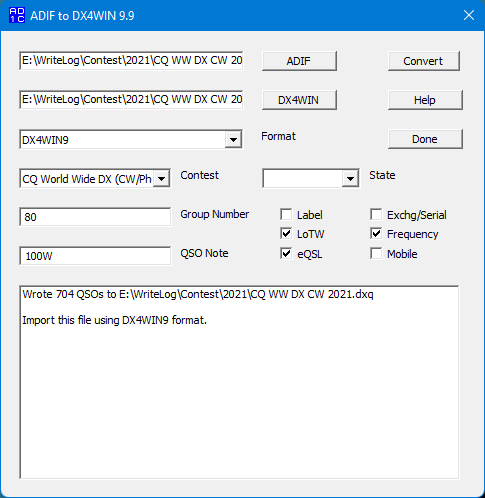
Specify the ADIF input file by clicking on the ADIF button. Once you specify the input file, the output file will be given the same name, but with a .DXQ extension. To change the output file name, click on the DX4WIN button.
Next, select the Format for the .DXQ (output) file. If you are using DX4WIN 8.0x, use the default format (DX4WIN8). If you are using DX4WIN 6.0x or 7.0x, choose the DX4WIN6 format instead. You must select this same format when importing the .DXQ file into DX4WIN (see below).
Next, select the Contest type. If you choose "State QSO Party", then you must select a state from the State drop-down menu. Not all contests are supported, others may be added over time. The operation of the program is unpredictable if you select the wrong contest type for your log.
Enter a Group Number, if desired. The default is Group 0 (the "all QSOs" group). Remember that you can also set the group number in your DX4WIN preferences, before starting the import.
You can enter text in the QSO Note field. You can put any text there you want, up to a maximum of 64 characters.
There are six (6) optional checkboxes:
- Checking the Label box sets the Label field for each imported QSO.
This setting is disabled by default.
- Checking the LoTW box sets the LoTW (Logbook of the World)
Upload flag for each imported QSO. This setting is enabled by
default.
- Checking the eQSL box sets the eQSL Upload flag for each
imported QSO, for users of DX4WIN 8 and later. This setting is enabled
by default.
- Checking the Exchg/Serial box does one of two things:
- For ARRL Field Day and Sweepstakes, the full received contest exchange is written to the "Notes for this QSO" field.
- For contests where serial numbers are exchanged, the received serial
number is written to the "Notes for this QSO" field, preceded by SerNr=.
This duplicates what would happen if you imported an ADIF contest log
directly into DX4WIN.
- Checking the Frequency box will write the frequency to the "Notes for
this QSO" field for DX4WIN 7 and earlier, or to the Frequency field in the
logbook for DX4WIN 8 and later. This feature is enabled by
default.
- Checking the Mobile box will automatically convert callsigns logged like K4KG/SUW to K4KG/M. Many mobiles in state QSO parties will sign the county they are operating from. If you leave these in the callsign, DX4WIN may treat them as a different DXCC entity (SUW would result in Egypt). The county in the callsign must exactly match the county you logged, or the conversion will not take place. This feature is disabled by default.
Finally, click on the Convert button to perform the conversion. If there are any warnings, they will show up in the window.
To import the resulting .DXQ file, choose File | Import/Export from the main DX4WIN menu. If you are using DX4WIN 8.0x, select the line in the Import/Export Filters window with DX4WIN8 in the ID column. If you are using DX4WIN 6.0x or 7.0x, select the line in the Import/Export Filters window with DX4WIN6 in the ID column. This must match the Format you chose when you converted the ADIF file. Next, in this same window, choose File | Import, then navigate to the location of the .DXQ file. Click on the name of the file, then on the Open button. DX4WIN will bring up an "Options for duplicate QSOs" window. Choose "Issue warning and stop". Then click on the OK button to import the file.
Supported Contests
- None
- All Asian DX Contest
- ARI International DX Contest
- ARRL 10 Meter
- ARRL 160 Meter
- ARRL International DX
- ARRL Field Day
- ARRL RTTY Round Up
- ARRL Sweepstakes
- ARRL January VHF
- ARRL June VHF
- ARRL September VHF
- BARTG HF RTTY
- BARTG Sprint
- CQ World Wide 160-Meter
- CQ World Wide WPX
- CQ World Wide DX (CW/Phone)
- CQ World Wide RTTY DX
- CQ World Wide VHF
- CQ-M International DX
- CQMM DX (Manchester Mineira)
- CW Open
- CWOPS Mini-CWT
- DL-DX RTTY Contest
- DRCG Long Distance Contest (formerly ANARTS WW RTTY) [inactive]
- EA RTTY
- FMRE International RTTY
- FT8 DX Contest
- FT8 Roundup
- HA-DX Contest
- Helvetia Contest
- His Majesty The King of Spain Contest
- IARU HF Championship
- Islands on the Air (IOTA)
- Japan International DX
- JARTS
- Makrothen RTTY
- Maritime QSO Party [inactive]
- North American QSO Party (NAQP)
- North American Sprint
- Oceania DX Contest
- OK DX RTTY
- OK-OM DX Contest
- RAC Canada Contests
- REF Contest ("Coupe du REF")
- Russian District (RDA) Contest
- Russian DX Contest
- Scandinavian Activity Contest
- SARTG WW RTTY
- SCC RTTY Championship
- SP DX Contest
- Stew Perry TBDC
- TARA Grid-Dip PSK/RTTY
-
TARA RTTY Melee [inactive]
- UBA DX Contest
- UK/EI DX Contest
- VK Shires Contest
- VOLTA RTTY Contest
- Worked All Europe DX Contest
-
Worked All Germany
- World Wide Digi DX
State QSO Parties:
- 7-Land QSO Party
- Alabama QSO Party
- Arizona QSO Party
- Arkansas QSO Party
- California QSO Party
- Colorado QSO Party
- Delaware QSO Party
- Florida QSO Party
- Georgia QSO Party
- Hawaii QSO Party
- Idaho QSO Party
- Illinois QSO Party
- Indiana QSO Party
- Iowa QSO Party
- Kansas QSO Party
- Kentucky QSO Party
- Louisiana QSO Party
- Maryland-DC QSO Party
- Michigan QSO Party
- Minnesota QSO Party
- Mississippi QSO Party
- Missouri QSO Party
- Nebraska QSO Party
- Nevada QSO Party
- New England QSO Party
- New Hampshire QSO Party
- New Jersey QSO Party
- New Mexico QSO Party
- New York QSO Party
- North Carolina QSO Party
- North Dakota QSO Party
- Ohio QSO Party
- Oklahoma QSO Party
- Oregon QSO Party
- Pennsylvania QSO Party
- South Carolina QSO Party
- South Dakota QSO Party
- Tennessee QSO Party
- Texas QSO Party
- Vermont QSO Party
- Virginia QSO Party
- Washington (state) Salmon Run
- West Virginia QSO Party
- Wisconsin QSO Party
(new contests in bold)
(*) This is a special case of the program that does not populate the Recvd field in the logbook. It can be used to add an optional QSO Note and/or Group Number to each QSO in the ADIF file before importing it into DX4WIN. It recognizes these ADIF fields: GRIDSQUARE, NAME, NOTES and QTH. Others can be added upon request.
For contests not listed above, if the exchange is only a serial number, you can choose CQ WPX.
Support
This program is offered as-is. I'll try to support it as best I can, but development is primarily motivated by the contests I operate.
I've only tested with very recent versions of N1MM, Win-Test (limited) and WriteLog. If the conversion doesn't go the way you expect, send me the .ADI file and I'll try to fix it.
If there is a bug, please let me know. If you want me to add a particular contest, the easiest way is to send me the .ADI (ADIF) file from your contest logging program (and of course tell me which contest it's from).
Things to Do
- Add support for working stations on county lines in state QSO parties
- Make it easier to change output file name
- Remember settings/selections
- Better Win-Test support